Sharing database models provides table-definition details from an independent data source to a dependent data source. This is needed to avoid analysis errors and to have a complete lineage that includes lineage from the SQL statements from dependent data sources.
What is a database model?
You can use Collibra Data Lineage to create technical lineage across multiple data sources. In each data source, a database model represents the structure of tables in a database.
This database model is derived from Data Definition Language (DDL) statements that define database objects. When metadata is harvested from a data source, Collibra Data Lineage extracts the DDL to build this model.
Common DDL statements include CREATE, ALTER, DROP, and TRUNCATE. In the context of data lineage, Collibra Data Lineage uses these statements to understand table structures.
Dependent vs. independent sources
To build an accurate lineage, Collibra must understand the structure of every table referenced in a query.
- Independent data source: The source that contains the DDL.
- Dependent data source: The source containing SQL statements that reference tables in the independent source.
Example
Database1(Independent): Contains the DDL that definesTable1with columnsCol1,Col2, andCol3.Database2(Dependent): Contains the statement:SELECT * FROM Database1.Schema1.Table1.
The statement in Database2 refers to a table defined in Database1, so Collibra Data Lineage needs the model from Database1 to correctly map the columns.
Solutions for ANALYZE errors
When Collibra Data Lineage cannot resolve a table or column reference, the following error may return:
ANALYZE: We're having trouble figuring out which table your column belongs to.
Use the table below to determine the best resolution for your environment.
| Feature | Add dependent sources (shared database models) | Adjust SQL statements (SQL file sources only) |
|---|---|---|
| Primary purpose | Share table definitions across sources for accurate lineage | Remove ambiguity within specific SQL files |
| Implementation | Change the settings in the capability if you use Edge, or in the configuration file if you use the lineage harvester (deprecated) | Modify the actual SQL files in your source system. |
| Scalability | High: One configuration handles all queries in the source | Low: Must be applied to every ambiguous query in every file |
Important considerations
Review the following considerations before configuring shared database models.
- SQL dialect compatibility
With the exception of Oracle, Snowflake, and Teradata, the dependent source must use the same SQL dialect as the independent source.
For example, if an independent source uses the Oracle dialect and the dependent source uses the Spark dialect, the independent (Oracle) source cannot be loaded when processing the dependent (Spark) source, due to the difference in dialects. - Case sensitivity
If the dependent data source uses lowercase column names, shared database models are supported only for Oracle, Snowflake, and Teradata. For other dialects, an analyze error is raised, prompting you to provide the DDL file, and you must consolidate the DDL and SQL statements into a single data source. - Namespace uniqueness
Analysis fails if database names specified as dependent sources exist in multiple systems. Ensure that all database names are unique across your environment.ExamplesExample 1
In this example, you specify Source 1 and Source 2 as dependent data sources. However, as shown below, you have a database named Database 1 in two different systems. This will fail because when analyzing an SQL statement, there is no way of knowing to which system Database 1 should be attributed.
Source 1
System A --> Database 1
System A --> Database 2
Source 2
System B --> Database 1
Example 2
Again you specify Source 1 and Source 2 as dependent data sources. This scenario is fine because Database 1 exists only in System A.
Source 1
System A --> Database 1
System A --> Database 2
Source 2
System A --> Database 1
Configuration steps
You can configure database model sharing using Edge or the lineage harvester (deprecated).
Using Edge
- Edit the Edge capability for the dependent data source.
- In the Dependent On Sources field, enter the Source ID of the independent source.
- Optionally, click Add property to include additional independent sources.
If you have a dependent data source, it's important that the analysis of each independent source is complete before you synchronize the dependent source. That's because the analysis of each independent source is needed to analyze the dependent source.
If the independent source is not analyzed first:
- SQL sources: Result in incomplete lineage and analysis errors.
- BI/ETL tools: Display a dummy column (*) in the technical lineage graph.
Using the lineage harvester (deprecated)
Include the dependentSourceIds property in your lineage harvester configuration file. This property is supported in version 2023.11 and newer.
"dependentSourceIds": ["<source ID of an independent source>", "<source ID of another independent source>"]
{
	"general": {
		"catalog" : {
			"url" : "https://companydomain.collibra.com",
			"username" : "my-Collibra-username"
			},
			"useCollibraSystemName" : false
	},
	"sources" : [
	{
		"id": "oracle-id",
		"type": "DatabaseOracle",
		"hostname": "host_url",
		"username": "user1",
		"collibraSystemName": "automation_csn",
		"port": 1521,
		"serviceNames": ["sn1", "sn2"],
		"databaseNames": ["db1", "db2"],
		"dependentSourceIds": ["source ID of Database1"],
		"deleteRawMetadataAfterProcessing": false
	} ]
}
Workaround: resolving ambiguity in SQL files
For SQL file sources where you do not want to use shared database models, you must explicitly qualify column references to avoid analysis errors.
The following example shows an ambiguous SQL statement. The analyzer cannot determine which table each column belongs to:
SELECT column1, column2
FROM table1, table2;
You can resolve this ambiguity by qualifying column references with table names or table aliases. The following examples show qualified SQL statements:
/* Using table names */
SELECT table1.column1, table2.column2
FROM table1, table2;
/* Using aliases */
SELECT t1.column1, t2.column2
FROM table1 AS t1, table2 AS t2;
Examples
The following examples show what happens:
- If a particular database model is not shared with a data source that is dependent on it.
- After specifying the dependency in the Edge capacity of the dependent data source.
| Data source type | Details |
|---|---|
| SQL |
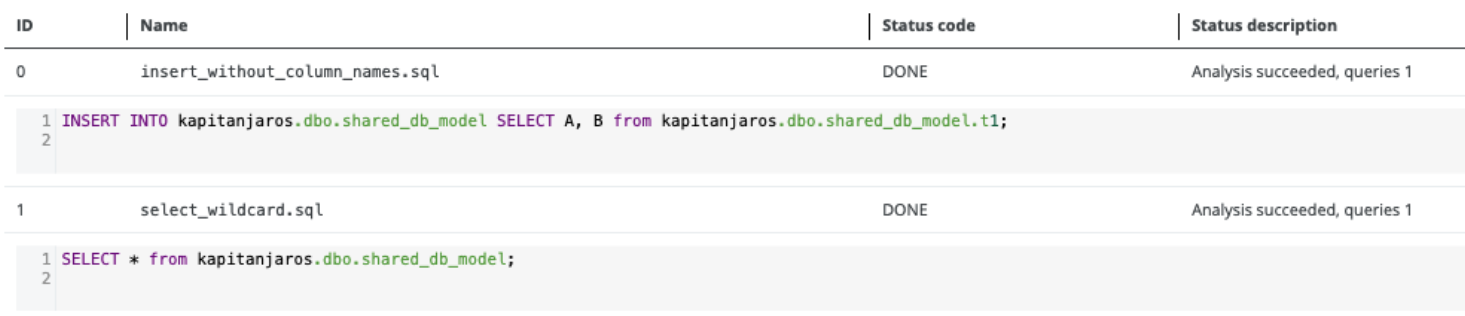
If the database model is not shared, analysis errors occur:
After specifying the dependency, the analysis errors are resolved.
|
| BI or ETL tool |
If the database model is not shared, a dummy column (*) is shown in the technical lineage graph.
After specifying the dependency, the columns are shown in the technical lineage graph.
|